Now available on Fab

Let AI Drive Your
Unreal Engine
Workflow

Webified Bridge connects Claude Code, Cursor, and any MCP-compatible AI agent directly to the UE5 editor. Spawn actors, run PIE tests, manage assets — all from a prompt.

151 tools  ·  UE 5.4–5.7  ·  Windows  ·  From $59 one-time
  151 tools connected
claude — webified-bridge session
you: Spawn 5 rock meshes in a grid at the origin   claude: Calling level.spawn_actor × 5… ✓ SM_Rock_01 spawned at (0, 0, 0) ✓ SM_Rock_01 spawned at (200, 0, 0) ✓ SM_Rock_01 spawned at (400, 0, 0) ✓ SM_Rock_01 spawned at (0, 200, 0) ✓ SM_Rock_01 spawned at (200, 200, 0)   claude: Done. 5 actors placed in a 3×2 grid. Want me to apply a random rotation to each?   you: Yes, and run a PIE smoke test after
  MCP via stdio · port 34763
151
Editor Tools
5.4–5.7
UE Versions
28
Recipe Workflows
MCP
Open Protocol
Featured Tool

Meet Webified Bridge

The first MCP-native Unreal Engine plugin. Give your AI agents full access to the UE5 editor — no custom scripts, no Python wrangling, no editor restarts.
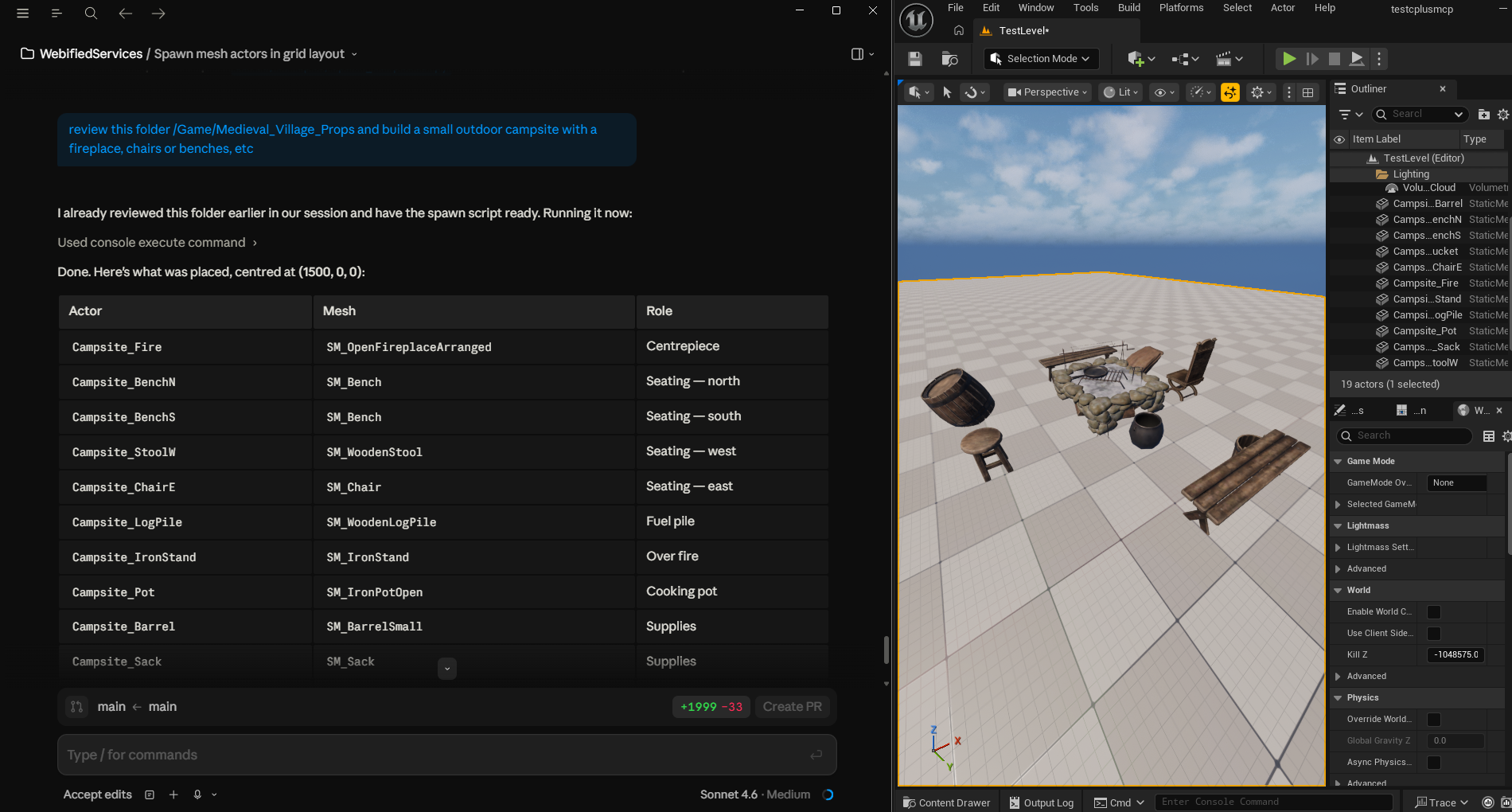
Webified Bridge — Claude Code controlling an Unreal Engine 5 scene in real time
● Live
Unreal Engine Plugin

MCP for Unreal Engine.
Finally.

Webified Bridge exposes 151 editor tools over the Model Context Protocol — level management, asset operations, sequencer, source control, viewport control, PIE automation, and more. Claude Code sees your editor the moment you start it.

  • 151 tools across 8 editor categories
  • 28 built-in composite recipes (lighting rigs, asset audits, PIE tests)
  • Approval gate for destructive operations — nothing gets deleted without your say-so
  • Live status panel with real-time call log inside the editor
  • No restart needed — hot-reload specs and scripts in seconds
  • Works with Claude Code, Cursor, or any MCP-compatible client
  • UE 5.4, 5.5, 5.6, and 5.7 all-green build matrix
Simple Setup

Up and running in 10 minutes

Install the plugin, point Claude Code at the sidecar, and start prompting. No server configuration, no cloud accounts.

01

Install the Plugin

Download from Fab. Drop into your project's Plugins/ folder. Enable in Edit → Plugins. Done.

02

Configure Claude Code

Add three lines to ~/.claude.json pointing at WBSidecar.exe. No API keys, no cloud.

03

Start Prompting

Run claude, check /mcp shows 151 tools connected, and ask Claude to build your scene.

~/.claude.json
{ "mcpServers": { "webified-bridge": { "command": "C:\\...\\WBSidecar.exe", "args": ["--port", "34763"] } } }

Everything you need to automate the editor

🧱

151 Editor Tools

Spawn, transform, duplicate, delete actors. Load and save levels. Control the viewport camera. All via natural language.

28 Recipe Workflows

Multi-step composite workflows — scene dressing, lighting rigs, asset audits, PIE smoke tests — run from a single prompt.

🔒

Approval Gate

Destructive operations require explicit confirmation. Nothing gets deleted or overwritten without your say.

📡

Live Resource Subscriptions

Subscribe to selection changes, actor lists, and level state. Your agent sees what's happening in real time.

🔄

Hot-Reload Registry

Edit tool specs or Python helpers and reload instantly with wb.reload_python — no editor restart needed.

🎮

4-Version Build Matrix

Tested and all-green on UE 5.4, 5.5, 5.6, and 5.7. One purchase covers every supported version.

The Full Lineup

More tools coming

Webified Bridge is the first in a catalog of AI-native tools for the Unreal Engine developer workflow.

🎮

Webified Bridge

Available

MCP server for the UE5 editor. 151 tools. Works with Claude Code, Cursor, and any MCP client.

from$59 View Tool
🔬

Webified Profiler

Coming Soon

AI-driven performance insights. Let agents identify bottlenecks and suggest optimisation actions from stat snapshots.

Notify Me
📦

Webified Import

Coming Soon

Batch asset import and organisation. Describe your pipeline in plain language — agents handle the import settings.

Notify Me
Community

Join the community

Get help, share workflows, watch tutorials, and stay up to date with new tools and releases.

Ready to ship faster?

Stop copy-pasting Python snippets. Let your AI agent drive the editor while you focus on the creative work.

One-time purchase · No subscription · UE 5.4–5.7 · Windows